|
Synchronize Time
|
|
Prev
|
Next
|
TimeLeft is a time synchronization utility. It can contact atomic clock servers
and adjust time on your computer according to their data.
Right-click TimeLeft system tray icon to bring up the menu and select Tools|Synchronize
Time to access Time Synchronization window:
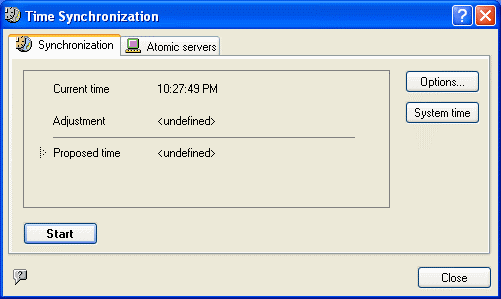
When you click Start TimeLeft queries atomic time servers and displays
the result in Proposed Time section. If there is considerable difference,
click Apply (see TimeLeft Deluxe) to
correct your system time automatically. Clicking a button next to Apply
opens a drop-down menu that lets you apply hours, minutes and seconds or minutes
and seconds only. To correct the system time manually, click System time
button.
Note: If TimeLeft suggests applying the time which is one hour (or several
undivided hours) different from your real time, this happens due to specific
time zone or energy-saving time adjustment settings in your system. In this
case you should use "Apply minutes and seconds only" feature.
Note:
TimeLeft uses Time Protocol (port 37) for synchronizing time.
Make sure this port is not closed by your ISP or firewall.
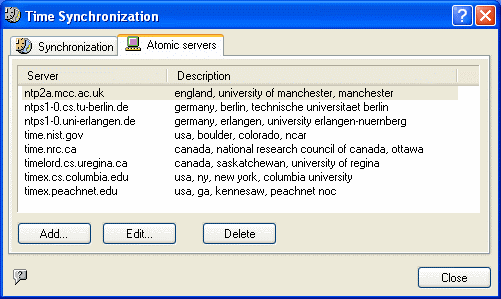
Atomic servers list can be edited: you can delete servers that are often inaccessible
from your location and add your own (click Add and enter server address
and description).
See also:
TimeLeft Deluxe
How to upgrade TimeLeft Free to TimeLeft Deluxe
Additional options and packs
| 


