TimeLeft Online Help  
Overview
What is TimeLeft
Floating Windows
Main Menu
Main Window
TimeLeft Free
TimeLeft Deluxe
Additional options and packs
How to Upgrade to TimeLeft Deluxe
System Requirements
How to...
Access Menu
Access Main Window
Reminder
Add New Reminder
Edit Reminder
Edit Message Window
Countdown
Add New Countdown
Edit Countdown
Export to Web
Edit Layout
Clock
Add New Clock
Edit Clock
Replace Window's clock
Edit Layout
Stopwatch
Add New Stopwatch
Edit Stopwatch
Edit Layout
Timer
Add New Timer
Edit Timer
Edit Layout
Sticker
Add New Sticker
Edit Sticker
Auction Watch
Add New Auction Watch
Edit Auction Watch
Synchronize Time
Resize floating windows
Export to Web
Workdays Countdown
Edit Layout
Edit Options
Scripting
Install and Uninstall
Support
Upgrade
Lost Registration Key
Reporting Problems
Contacts
FAQ
About NesterSoft
Main Window   Prev Next

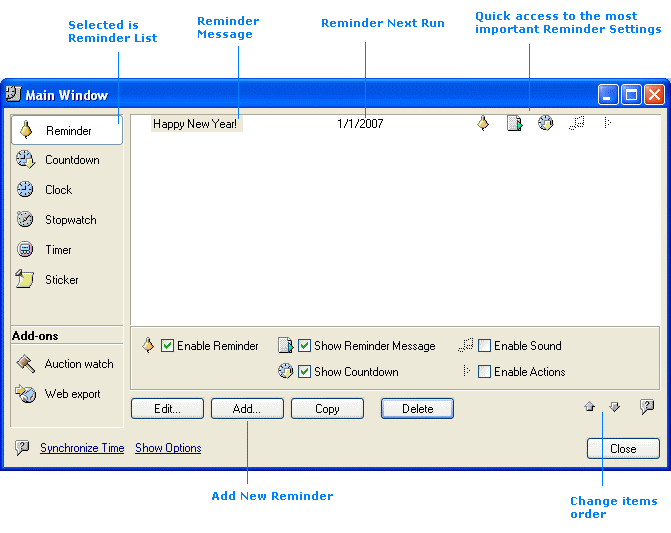
This is TimeLeft Main Window. To access TimeLeft Main Window open TimeLeft Main Menu and click My Reminder or My Countdown or any of "My" menu items.
From the Main Window you can access any reminder, countdown, clock, stopwatch, timer, sticker or auction time watch defined in TimeLeft. Also you can access Export Countdown To Web, Time Synchronization window and TimeLeft global Options.

Back to TimeLeft